
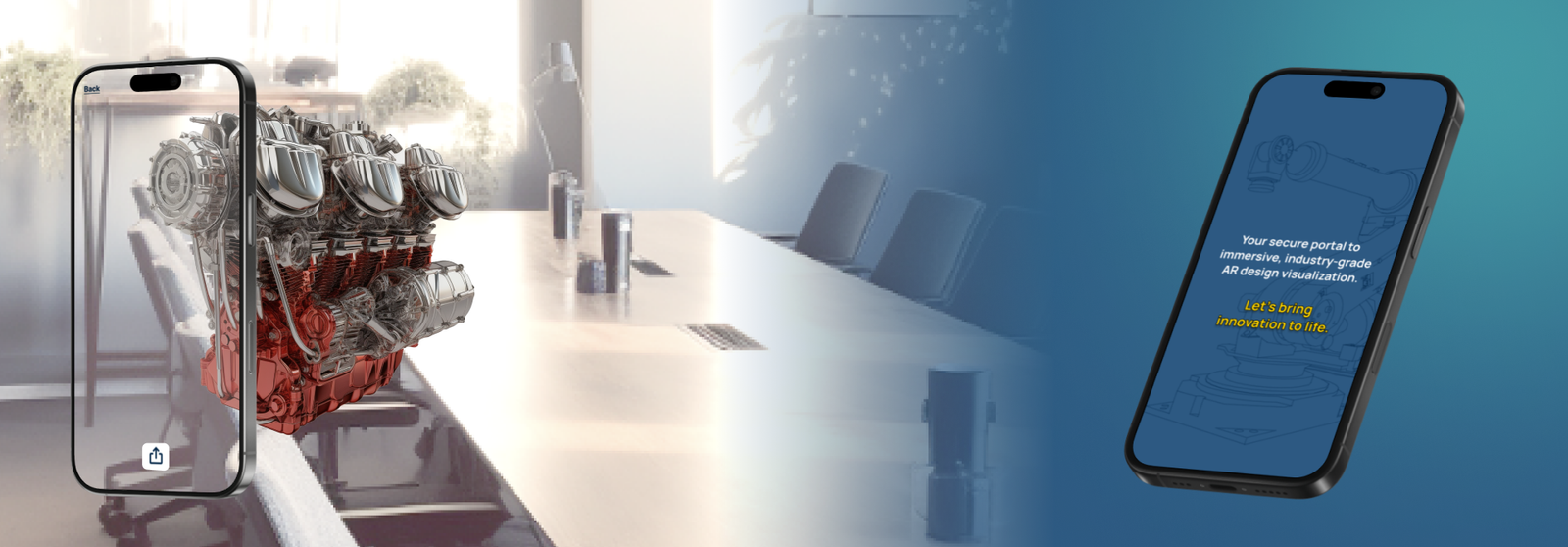
WebXR Industrial Planning Visualization
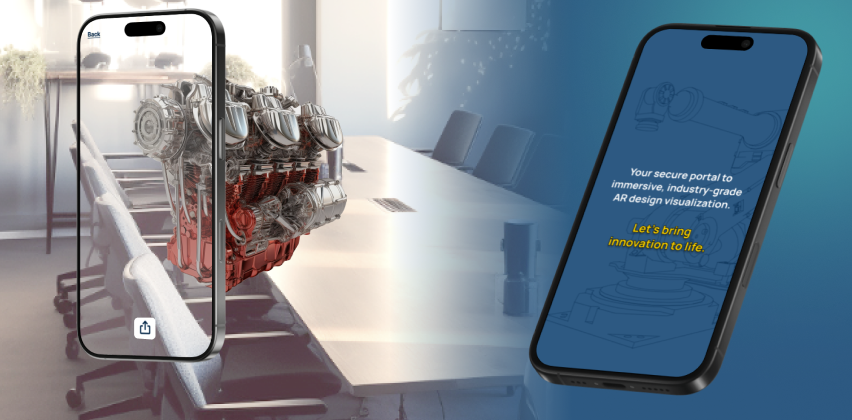
An R&D prototype exploring how mobile WebXR can support industrial planning through real-scale 3D visualization and manipulation of machinery components.
Overview · Problem & Goals · Research · Design Process · Solution · Results · Learnings
Project Overview
Client
Multinational industrial companies (R&D exploration)
Team
UX Designer / Product Owner (me), Developer, 3D Artist, UI Designer.
Role / Responsibilities
Product Owner & UX Designer
- Defined vision, scope, and target use cases
- Prioritized features for a focused WebXR prototype
- Competitor & trend analysis
- User stories, wireframes, flows
- Interaction logic for AR navigation & object manipulation
- Coordination with dev & 3D art teams
- Internal QA to validate usability and precision
- Application Design Document (ADD)
Tools
- Figma,
- Asana
- Teams
- Microsoft 365
Duration
~4–6 weeks (R&D cycle)
Problem statement
Industrial planning often relies on static models, diagrams, or desktop viewers that fail to communicate the true physical footprint of large machinery or components. The challenge was to explore whether mobile WebXR could provide a lightweight, accessible way to visualize equipment at real scale directly in a factory or warehouse environment.
Goals
- Validate feasibility of WebXR for industrial real-scale visualization
- Enable simple object manipulation (move, rotate, scale)
- Make the experience mobile-friendly and easy to access (no app install)
- Identify minimal viable features for a SaaS solution
- Understand limitations of WebXR for future industrial products
- Create a prototype that communicates value without scope expansion
Research insights
Methods
- Competitor analysis (industrial AR tools)
- WebXR / 8th Wall capability review
- Device limitation mapping (camera, tracking, lighting)
- Internal tests with different environments
Key insights
- Mobile AR accuracy varies depending on surface type & lighting
- Large objects require anchoring strategies to prevent drift
- Interaction gestures must be extremely simple & forgiving
- Users expect precise spatial placement despite mobile hardware limits
- Real-scale visualization has strong value for planning and sales conversations
User personas
Persona 1:
Industrial planners and engineers needing quick, real-scale previews of machinery without specialized hardware. Constraints include variable environments, no AR expertise, limited time onsite, and the need for stable, predictable interactions.
Design process
1 Discovery
Identified industrial pain points, mobile AR limitations, and high-value use cases for visualization in real environments.
2 Define
Created personas, core workflows, and the minimal viable capabilities needed to communicate value: scale, rotation, movement.
3 Ideate
Produced user stories and storyboards to explore gesture models, anchoring behavior, and spatial placement flow.
4 Design
Created wireframes, user flows, and the Application Design Document defining gestures, UI placement, instructions, and fallback behaviors.
5 Prototype Review
Collaborated with developers testing 8th Wall-based builds, evaluating tracking stability, gesture responsiveness, and AR anchoring.
6 Refine & Reflect
Ran QA sessions, adjusted interaction thresholds, summarized learnings, and documented recommendations for future products.
Visual journey
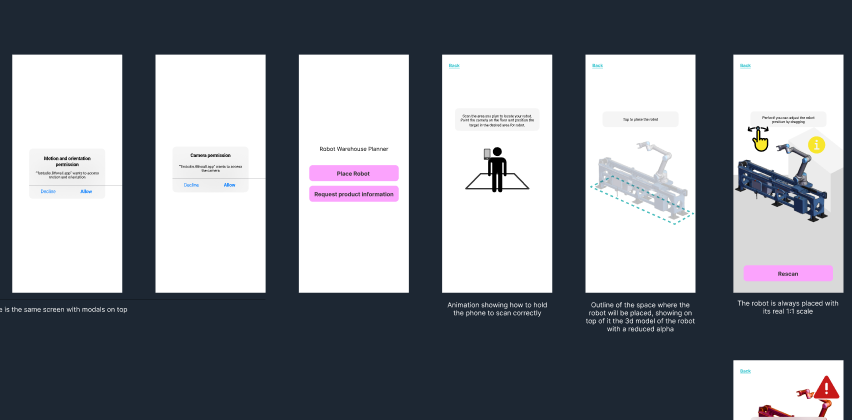
Early Concept & Structure
Initial storyboard and flow exploration defining the AR placement path, controls, and core interactions.
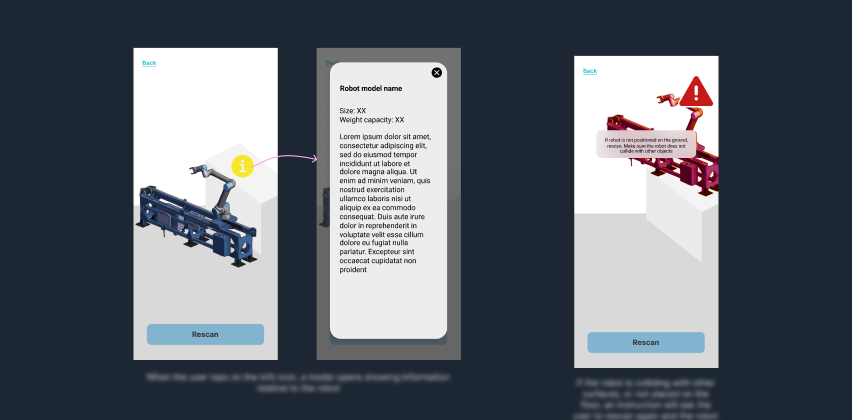
Wireframes
Wireframes showing placement UI, gestures, error states, and minimal AR instructions.
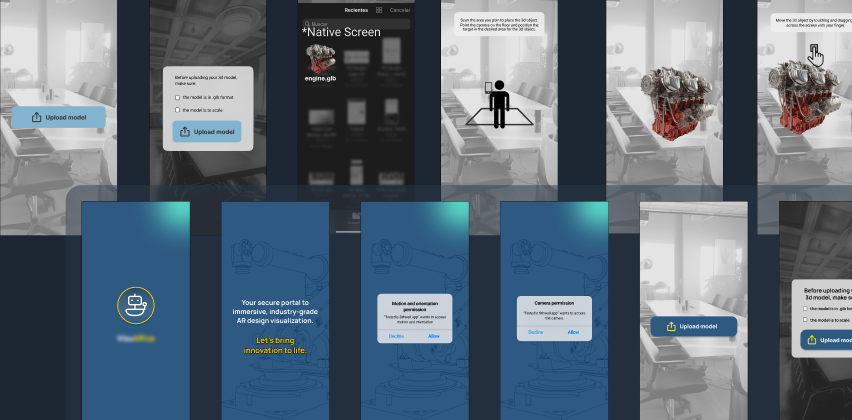
UI Exploration
Non-final UI directions used to clarify hierarchy, positioning, and interaction moments.
Prototype Validation
Screenshots from internal tests assessing tracking stability, gesture behavior, and spatial accuracy.
The solution
Key features
- Real-scale AR visualization
- Simple mobile gestures: move, rotate, scale
- Surface detection & anchoring
- Lightweight WebXR delivery (no app install)
- Minimal UI for industrial clarity
- Rapid onboarding for non-AR users
Technical decisions
- WebXR via 8th Wall for accessibility
- Gesture model optimized for simplicity
- Anchoring reinforced with environmental scanning
- Low-poly optimization for performance
- Transparent UX overlays to support real environments
Results & impact
Results
- Delivered a working WebXR demo illustrating feasibility
- Validated real-scale visualization through multiple internal tests
- Documented constraints and recommended solutions for future products
Impact
- Helped internal teams understand AR’s role in industrial planning
- Provided a reusable interaction model for future WebXR projects
- Strengthened cross-team communication between 3D, dev, and UX
- Informed future client-facing proposals and pitches
Key learnings
- Mobile AR accuracy is highly environment-dependent
- Users expect desktop-level precision in AR interactions
- Simple gestures outperform complex ones in industrial contexts
- Clear instructions drastically reduce onboarding friction
- WebXR is viable but requires careful scope control
Next steps
- Expand support for multi-object layouts
- Add measurement tools and snapping
- Explore collaborative AR sessions
- Integrate metadata and equipment specifications
- Improve anchoring stability for low-texture surfaces
Confidentiality note
This case study is a reconstructed summary created under NDA. It excludes all proprietary client content, and any visuals shown are my own prototypes or placeholder examples.