
PPE Training Simulation
Immersive VR training that teaches electrical technicians to select and equip Personal Protective Equipment (PPE) correctly in a high-risk scenario, using a realistic digital twin of a datacenter changing room.
Overview · Problem & Goals · Research · Design Process · Solution · Results · Learnings
Project Overview
Client
Confidential industrial company (Arc Flash / NFPA 70E training)
Team
UX Designer, Unity Developers, 3D Artists, Product Manager, Product Owner, Industry Experts (client side)
ROLE / Responsibilities
UX Designer
- Interaction model design (highlight, grab, equip)
- Onboarding and task selection flow
- Wrist UI logic (status, PPE checklist)
- Tooltip rules and timing
- User flows, wireframes, storyboard
- Application Design Document (ADD)
- UX QA + iteration with dev team
- VR accessibility considerations for beginners
Tools
- Figma
- Unity
- Teams
- Azure
- Blender
- Microsoft 365
Duration
8–10 weeks | 2021
Problem statement
Technicians must follow strict PPE procedures to stay safe during high-risk electrical tasks, but traditional training is mostly theoretical. The company needed a VR module to teach the correct PPE sequence in a realistic, distraction-heavy environment that mimicked true conditions.
Goals
- Train correct PPE order (NFPA 70E)
- Mirror real datacenter changing-room conditions (noise + layout)
- Support first-time VR users with clear onboarding
- Provide intuitive interactions and real-time feedback
- Maintain low cognitive load with a simple wrist UI
- Demonstrate XR potential for future training modules
Research insights
Methods
- Industry expert interviews
- Analysis of PPE procedures
- Benchmarking VR onboarding patterns
- Internal testing with VR beginners
Key insights
- The real environment is loud → must mimic distractions
- PPE order must be enforced to prevent unsafe habits
- Users need constant PPE status visibility (no mirrors allowed)
- Teleport is the safest locomotion for this audience
- Tooltips and timing cues reduce hesitation in VR beginners
User personas
Persona 1:
An electrical technician working in a high-risk environment. Needs clear guidance, low cognitive load, and realistic environmental noise. Main constraints: no VR experience, limited training time, and the need to feel confident their PPE is correct before a hazardous task.
Design process
1 Discovery
Mapped real procedures, gathered expert input, and identified constraints of Quest 2 and VR beginners.
2 Ideation
Sketched flows for onboarding, task selection, PPE interaction, wrist UI, and tooltip behavior.
3 Flows & wireframes
Defined structure, PPE sequence, instructional hierarchy, and interactions through wireframes and user flows.
4 Prototyping
Created a Unity prototype to test highlight behavior, grabbing, snapping, and wrist UI accessibility.
5 Testing
Internal UX QA and guerrilla tests to validate clarity of interactions, onboarding, and environmental noise.
6 Iteration & handoff
Refined timing, cues, and flows; delivered ADD, wireframes, and UX guidance to development and art teams.
Visual journey
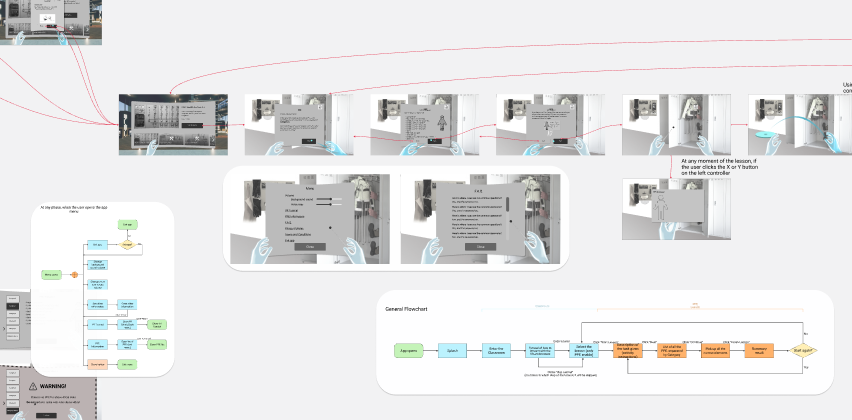
Wireframes
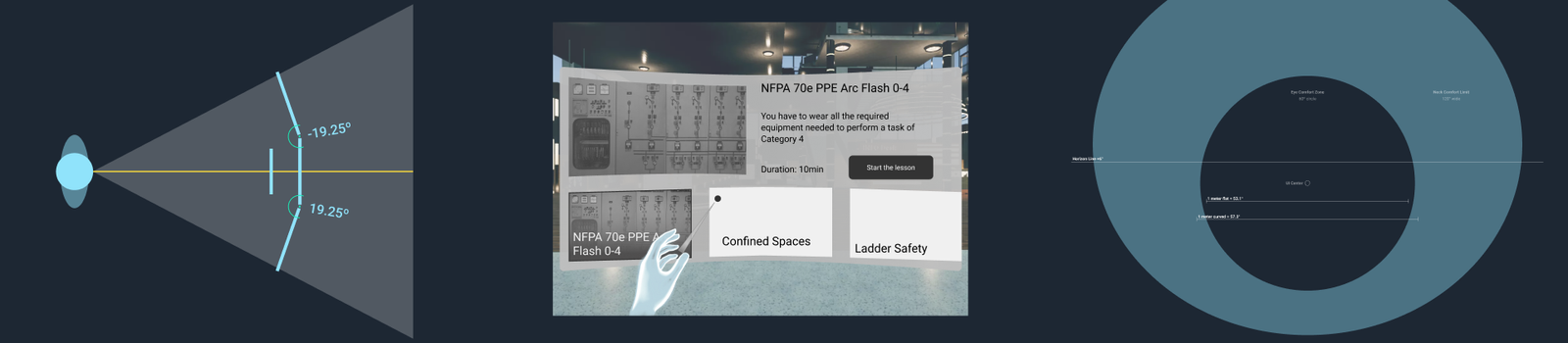
Structure of onboarding, task selection, PPE logic, and wrist UI.
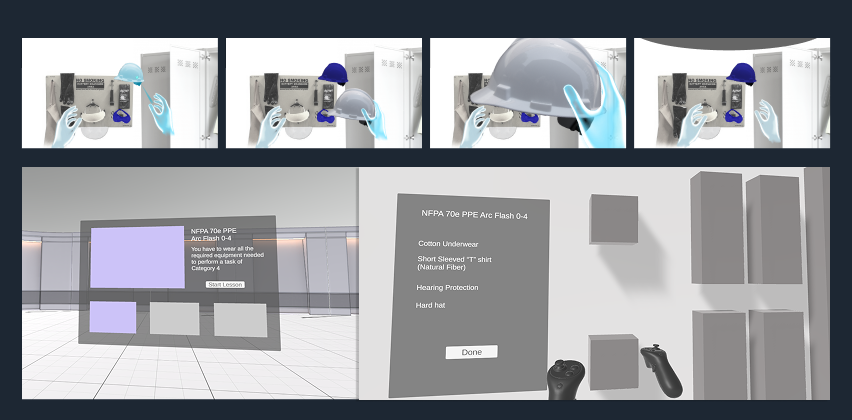
Interaction Prototype
Unity test validating highlight → grab → equip → ghost object → wrist UI.
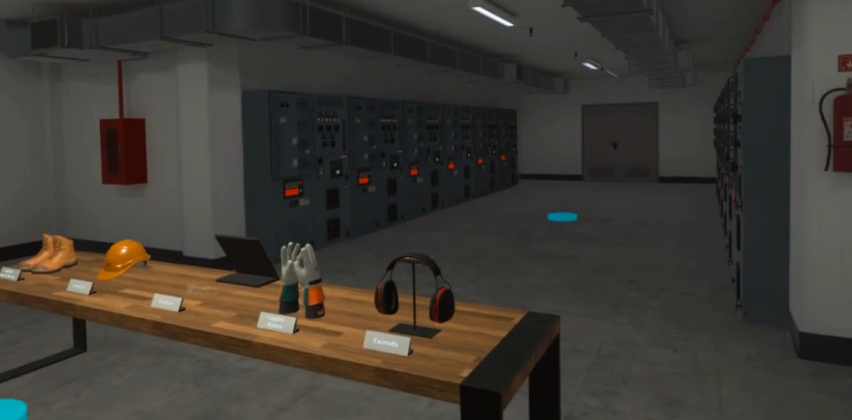
Final Experience (Implemented by Dev/Art)
Digital twin environment, tooltips, and wrist menu following UX logic.
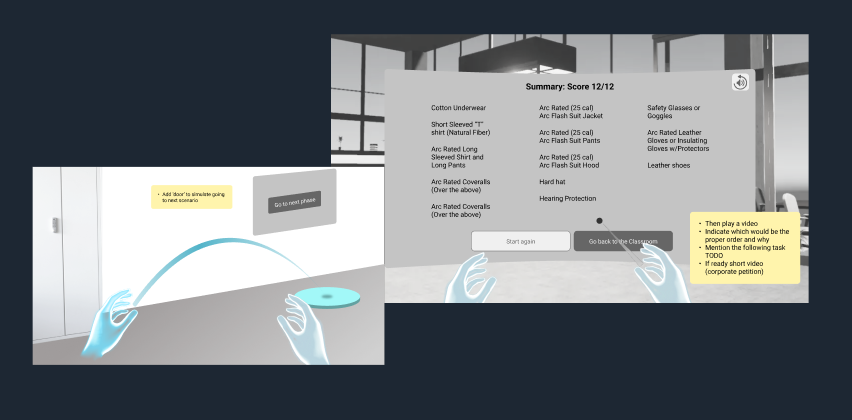
Validation
Internal QA and expert feedback shaping instruction placement, timing, and sequencing.
The solution
Key features
- Teleport locomotion
- Realistic noise + environmental cues
- Highlight → grab → equip interaction
- Ghost objects for missing PPE
- Wrist UI with real-time status
- Task selection lobby
- Tooltip system for correct usage
- Summary screen for correctness
Technical decisions
- Full VR for immersion
- Floating panels for clarity
- Lightweight assets optimized for Quest 2
- No mirrors → wrist UI as solution
- Strict PPE ordering logic
Results & impact
Results
- Technicians could complete PPE flow without assistance
- Realistic distractions increased training authenticity
- Interaction clarity validated through internal testing
- XR training approved for future expansion
Impact
- Reinforced safety procedures
- Improved recognition of correct PPE order
- Provided scalable model for future VR training modules
Key learnings
- VR beginners require extremely clear guidance
- Environmental noise can be an intentional training tool
- Wrist-mounted UI is more intuitive than expected
- Timing and cues drastically improve flow comprehension
- Early prototypes save time in later development
Next steps
- Add scenario-based tasks
- Integrate LMS tracking
- Expand to multiple PPE categories
- Introduce performance scoring and feedback
- Enable multi-step training journeys
Confidentiality note
This case study is a reconstructed summary created under NDA. It excludes all proprietary client content, and any visuals shown are my own prototypes or placeholder examples.